Evidence mail finder in Microsoft 365
In which mailbox, when and under what subject is the message for this case. The application answers that one question and cannot answer any other.
- 0
- message-body fields in the database
- 4
- fields reach the screen
- 1250
- automated tests before every change
- STATUS
- Production solution, developed iteratively
- ROLE
- Architecture, security, implementation, deployment, maintenance
- AREA
- Microsoft 365 · Internal applications · Data protection
When a dispute with a customer or a settlement question comes up, accounting needs the e-mail where the terms were agreed. It sits somewhere in one of dozens of sales mailboxes. Until now that meant asking everyone in turn or having IT search mailboxes manually, giving third parties access to other people's mail. I built an application that points to the right mailbox, date, subject and folder, and leaves the rest to the mailbox owner.
The tool answers one question only: in which mailbox, when and under what subject is the message for this case. It never shows body text, senders, recipients or attachments. The user then contacts the mailbox owner, who confirms the facts and forwards the message. The privacy of correspondence does not depend on a policy document but on what the application is technically unable to do.
- 01The message could be in any of dozens of mailboxes, including deleted items, and the person searching did not know which one.
- 02The previous route, manual mailbox searches by IT, meant third-party access to other people's mail.
- 03The tool could not show body text, senders, recipients or attachments, and that rule had to follow from the system design rather than from user instructions.
- 04Microsoft 365 limits and response times had to be measured on real mailboxes before the search parallelism was fixed.
- 05A user in accounting or sales had to get a result without knowing any mail query syntax.
An internal web application with domain single sign-on and no extra passwords. The user enters a customer, order number or phrase and a date range. The system searches all sales mailboxes in parallel, including deleted items, and returns within seconds: salesperson, date, subject, folder. Every search is kept in a case history with a case number, every action in an audit log.
- 01Administrators choose, inside the application, which domain groups' mailboxes are searched. Changing the scope needs no code change.
- 02The admin panel shows synchronisation state and the validity of the certificate used to access Microsoft 365.
- 03The audit log exports to CSV.
Body text, senders, recipients and attachments never leave Microsoft 365.
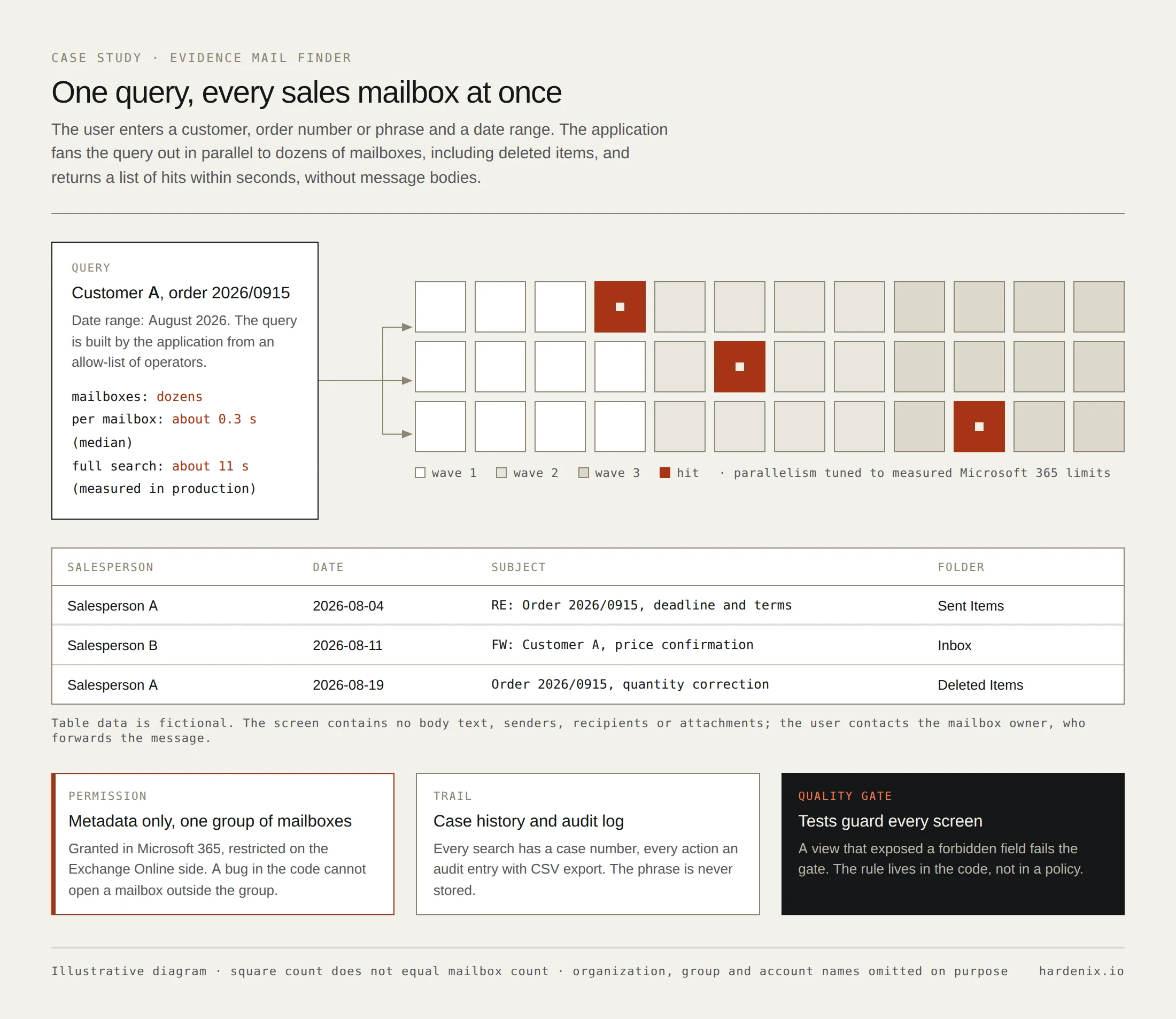
- 01In Microsoft 365 the application holds a metadata-only permission, without message bodies, restricted in Exchange Online to a single group of mailboxes. Even a bug in the code cannot reach a mailbox outside that group.
- 02Only mailbox, date, subject, folder and status ever reach the screen, database, logs or audit trail. The search phrase is never stored.
- 03Mail queries are built exclusively by the application from an allow-list of operators. Users cannot enter their own syntax.
- 04Authorization is enforced server-side on every action. The service account is domain-managed, cloud authentication uses a certificate, and there are no passwords in files.
- 05Automated tests guard these rules on every screen. If any view exposed a forbidden field, the change would fail the quality gate.
Short iterations, each ending with a deployment and a report based on measurements rather than declarations. Every significant decision has an architecture decision record backed by vendor documentation. Microsoft 365 limits and response times were measured on real mailboxes before the configuration was fixed. Deployment is repeatable: a package with a checksum manifest compared before and after copying to the server, a ready rollback procedure and environment recovery documentation.
- 01First production release after five days; the version with audit export after nine iterations in nine days.
- 02Median search time per mailbox about 0.3 s, a full search about 11 s (measured in production).
- 03About 1,250 automated tests run before every change, 14 documented architecture decisions.
- 04Zero message-body fields in the database. Finding the correspondence for a case no longer requires third-party access to other people's mailboxes.
.NET 10 · Blazor · C# · Microsoft Graph · Exchange Online · SQL Server · IIS · Active Directory · domain SSO
Anonymized material. The names of organizations, groups, accounts, servers and domains have been omitted. Data on the diagrams is fictional.