Transport document automation for ERP invoices
Cyclic matching of transport documents to ERP invoices without another application to maintain.
- STATUS
- Production solution
- ROLE
- Architecture, implementation, production deployment, documentation
- AREA
- System integrations · ERP · Logistics
The carrier generated a PDF document for each shipment, but the files landed in bulk in a network folder, named by the waybill number. The user working on an invoice knew a different key, so finding the document meant a manual search. I built an integration that automatically imports the files, matches them to the sales documents in the ERP and makes them available at the invoice, without adding another full application to maintain.
- 01The transport document and the invoice were related in business terms, but technically they lived in two different places.
- 02A folder of files provided no process retention, no state information and no convenient audit.
- 03A document could appear before the waybill number was filled in at the invoice.
- 04One shipment could cover more than one invoice.
- 05The solution had to run in production without modifying the ERP standard and without adding an unnecessary platform.
The process was built from elements already present in the environment: SQL Server, the job scheduler, the ERP attribute mechanism and the existing notification channel.
- 01Source: the PDF file lands in a controlled folder, and its name contains the waybill number.
- 02Trigger: a scheduled job runs the import during working hours.
- 03Import and validation: name checks, saving the document to the repository and a run log.
- 04Matching: the waybill number is compared against the information at the sales document in the ERP.
- 05Publication: a link to the document appears at the matched invoice, and the source file goes to the archive.
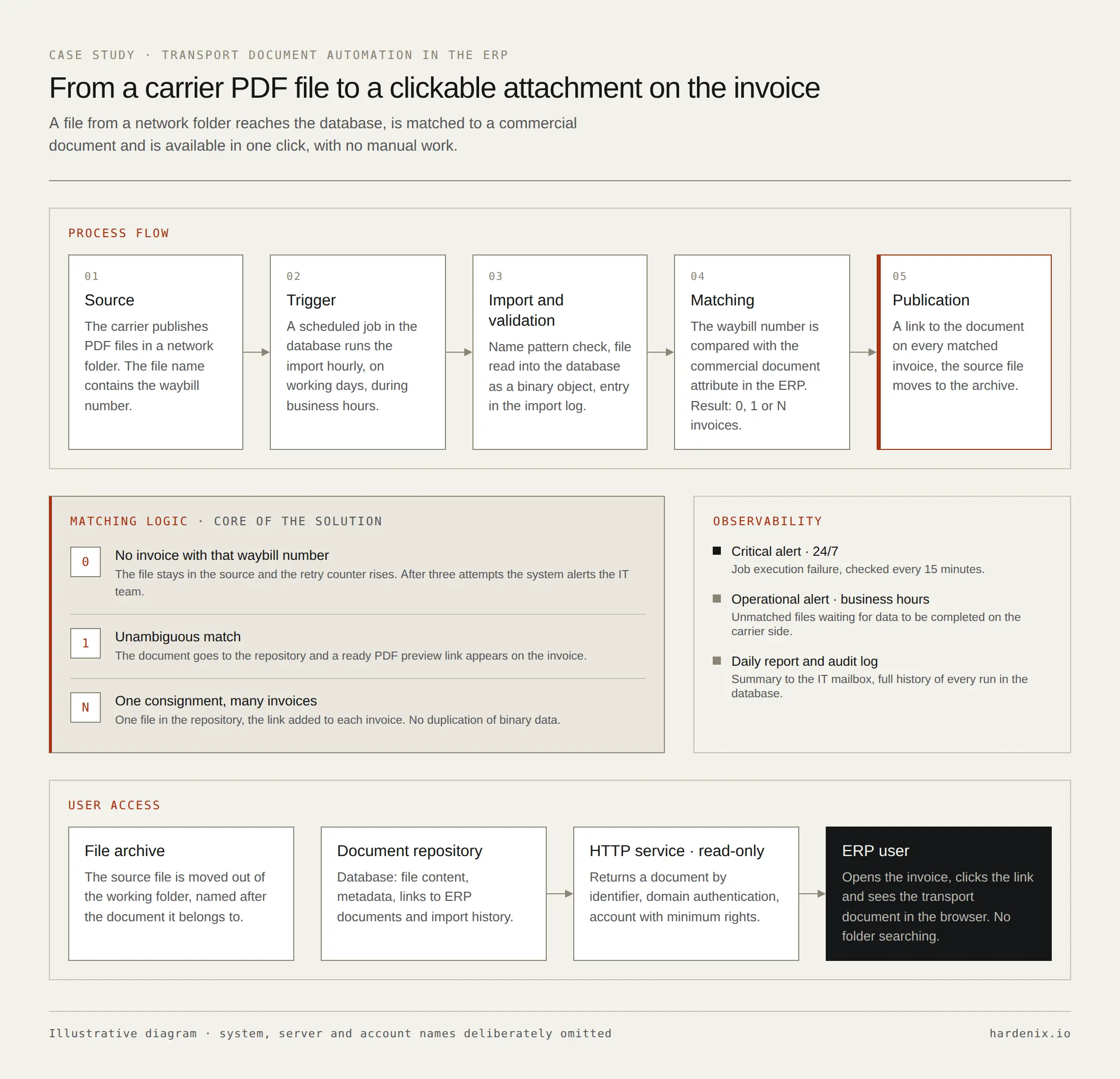
- 01No match. The file stays for a retry. Only repeated failed runs raise an alert, with protection against sending the same information multiple times.
- 02One match. The document goes to the repository and becomes available at the invoice. A value previously entered manually by a user is not automatically overwritten.
- 03Multiple matches. About 6% of shipments covered more than one invoice. The file is stored once, and a reference is available at every related document.
The automation has its own operational trail.
- 01A critical alert on an execution error.
- 02An operational alert for files waiting for data on the process side.
- 03A daily report for the IT team.
- 04A log of every run with the number of files found, imported, skipped and unmatched, and the execution time.
- 01Several hundred documents were linked to invoices during the first full run.
- 02The transport document is available in one click from the invoice.
- 03The link between a shipment and a sales document is recorded in the system instead of remaining user knowledge.
- 04Files go to a repository covered by backup and retention policies instead of staying in an unmanaged folder.
- 05Extending the solution to a new scope required a configuration change, not a new code deployment.
- 01Logic close to the data instead of a separate application: the problem and the volume did not justify another platform.
- 02Configuration instead of values hard-coded in the source: a scope change does not require a deployment.
- 03The ERP remains the source of truth for document relations.
- 04Retry instead of an immediate alarm: the business process may be slower than the automation.
- 05A controlled way of deploying to production: diagnostics, a state copy, a transaction and the ability to roll back.
SQL Server · T-SQL · scheduled jobs · PowerShell · transactional e-mail · lightweight HTTP service
Anonymized material. The names of the organization, the carrier, internal systems, servers and identifiers have been omitted.